0xFUN CTF - Pixel Rehab Writeup
3 minute reading time
Posted at: February 22, 2026 • 2:06 AM
Assalamu Alaikum, welcome to my writeup for the Pixel Rehab challenge of 0xFUN CTF 2026! This is an interesting challenge from the forensics category. The difficulty level is hard. Here's the challenge description:
Our design intern “repaired” a broken image and handed us the result, claiming the important part is still in there. All we know is the original came from a compressed archive, and something about the recovery feels suspicious. You’re given one file. It looks like an image problem. It behaves like an image problem. Find what was actually archived and submit the flag in the format
0xfun{...}.
We are given a file called pixel.fun. Running exiftool on it gives the following output:
❯ exiftool pixel.fun
ExifTool Version Number         : 13.44
File Name                       : pixel.fun
Directory                       : .
File Size                       : 637 kB
File Modification Date/Time     : 2026:02:22 08:01:37+06:00
File Access Date/Time           : 2026:02:22 08:01:37+06:00
File Inode Change Date/Time     : 2026:02:22 08:01:37+06:00
File Permissions                : -rw-r--r--
Error                           : Unknown file type
Nothing interesting here... Let's try hexdump -C:
00000000  88 50 4e 47 0d 0a 1a 0a  00 00 00 0d 49 48 44 52  |.PNG........IHDR|
00000010  00 00 03 e8 00 00 02 8a  08 02 00 00 00 21 8a e6  |.............!..|
00000020  56 00 01 00 00 49 44 41  54 78 9c ec dd 75 5c 93  |V....IDATx...u\.|
00000030  eb ff 3f f0 6b 8c 46 a4  51 40 90 12 a4 14 03 03  |..?.k.F.Q@......|
00000040  05 c5 c2 16 8f a8 d8 9d  c7 ae 63 77 7b 8c 63 77  |..........cw{.cw|
00000050  77 17 a2 a0 22 76 81 05  22 12 4a 83 74 c7 18 fb  |w..."v..".J.t...|
00000060  fd 71 7f 3f fb cd dd 63  6c 63 30 86 af e7 e3 3c  |.q.?...clc0....<|
00000070  ce 43 ae fb da 75 5f 77  6c 7b ef ba af 60 14 14  |.C...u_wl{...`..|
00000080  14 10 00 00 00 00 00 a8  dd 14 64 5d 01 00 00 00  |..........d]....|
00000090  00 00 a8 1c 02 77 00 00  00 00 00 39 80 c0 1d 00  |.....w.....9....|
000000a0  00 00 00 40 0e 20 70 07  00 00 00 00 90 03 08 dc  |...@. p.........|
000000b0  01 00 00 00 00 e4 00 02  77 00 00 00 00 00 39 80  |........w.....9.|
[omitted]
The first 8 bytes are very similar to the PNG signature, which is 89 50 4e 47 0d 0a 1a 0a. However, the first byte is
88 instead of 89. This is a very small difference, but it makes the file unreadable as a PNG image. So, let's
edit that byte and set it to 89. After editing using hexedit, saving it as pixel.png and opening the file, we
get the following:
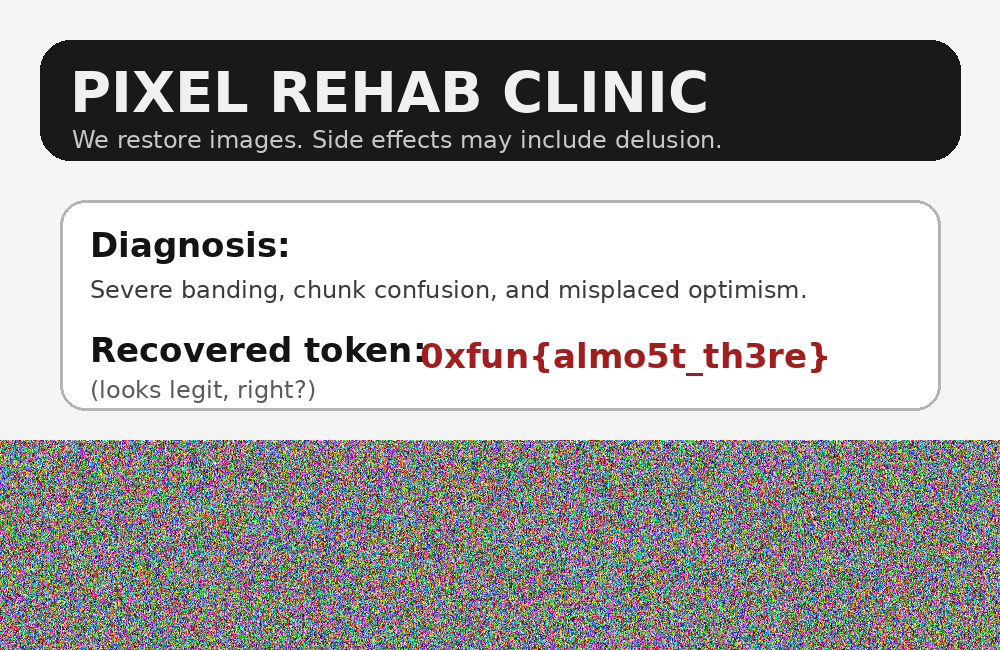
The flag here is a false flag which tells us that there's more to this. The gibberish pixels in this image hints towards
extra data embedded into this image. Let's run pngcheck -v pixel.png and check the output:
❯ pngcheck -v pixel.png
File: pixel.png (636966 bytes)
  chunk IHDR at offset 0x0000c, length 13
    1000 x 650 image, 24-bit RGB, non-interlaced
  chunk IDAT at offset 0x00025, length 65536
    zlib: deflated, 32K window, default compression
  chunk IDAT at offset 0x10031, length 65536
  chunk IDAT at offset 0x2003d, length 65536
  chunk IDAT at offset 0x30049, length 65536
  chunk IDAT at offset 0x40055, length 65536
  chunk IDAT at offset 0x50061, length 65536
  chunk IDAT at offset 0x6006d, length 65536
  chunk IDAT at offset 0x70079, length 65536
  chunk IDAT at offset 0x80085, length 65536
  chunk IDAT at offset 0x90091, length 45789
  chunk IEND at offset 0x9b37a, length 0
  additional data after IEND chunk
ERRORS DETECTED in pixel.png
As expected, there's extra data after the image ends. Using the following script, we extract the trailing data:
# extract_final.py
filename = "pixel.png"
output_file = "hidden_data.bin"
# Offset from pngcheck + 12 bytes for the IEND chunk itself
iend_offset = 0x9b37a
start_of_hidden_data = iend_offset + 12
with open(filename, "rb") as f:
f.seek(start_of_hidden_data)
hidden_data = f.read()
with open(output_file, "wb") as out:
out.write(hidden_data)
print(f"Extracted {len(hidden_data)} bytes to {output_file}")Running it gives the following output:
❯ python3 extract_final.py pixel.png
Extracted 1184 bytes to hidden_data.bin
Let's open hidden_data.bin in hexdump:
00000000  0d 0a 00 04 cc ac 11 59  22 04 00 00 00 00 00 00  |.......Y".......|
00000010  62 00 00 00 00 00 00 00  6b 5e af 4d e0 05 03 04  |b.......k^.M....|
00000020  1a 5d 00 29 12 44 eb bb  f0 31 34 4e 31 3c 52 2d  |.].).D...14N1<R-|
00000030  38 e2 a2 b9 51 1a c3 74  31 1a 63 0e 7a e9 f8 f4  |8...Q..t1.c.z...|
00000040  c5 fb 4d 4f d4 27 60 63  1d 06 67 ef 07 8f ab c0  |..MO.'`c..g.....|
00000050  78 75 a1 42 2a f2 6a b2  04 eb e5 d3 3c de 71 fa  |xu.B*.j.....<.q.|
00000060  7a 00 eb f6 e5 69 e3 b1  f7 7d 1a 75 00 9c 3e 10  |z....i...}.u..>.|
00000070  6d a5 ed d1 ed e8 2b 4d  fc 19 9d 36 66 bc 35 13  |m.....+M...6f.5.|
00000080  37 ee e2 67 54 09 91 3f  ed 7b b7 fd d1 8f 8a c3  |7..gT..?.{......|
00000090  6f 4a f3 6a 32 9e 72 41  cc 48 8d 24 ee 18 29 41  |oJ.j2.rA.H.$..)A|
000000a0  d7 5f 62 47 b6 54 36 b2  2b dc 27 46 f1 de df ae  |._bG.T6.+.'F....|
000000b0  25 9e d2 aa 16 94 92 a7  3b ce b4 2c ae 00 55 c0  |%.......;..,..U.|
[omitted]
Looking back at the problem description:
All we know is the original came from a compressed archive,
This hints that the file is a compressed archive. The header does not really match with ZIP header which starts with
50 4B 03 04. Digging deeper, we can see that it has 00 04 cc ac 11 59 in the first couple of bytes. After some
researching, it was found that 00 04 is the 7z version(major and minor) and cc ac 11 59 is the CRC of the header.
But, here 0d 0a is carriage return. So, maybe the signature was replaced with 0d 0a?
Let's do surgery on this file and replace 0d 0a with proper 7z signature: 37 7A BC AF 27 1C. For this, let's run the
following command:
printf '\x37\x7A\xBC\xAF\x27\x1C' | cat - <(tail -c +3 hidden_data.bin) > recovered.7zLet's slow down and see what the command actually does:
printfprints the bytes inSTDIN. Which we pipe tocat.- The first argument
-to cat tells it to read fromSTDIN. - The
<(tail -c +3 hidden_data.bin)tellstailto start from the 3rd byte and output the rest of the file toSTDINand sends it to cat. catthen first prints the content of the first argument and then the second argument toSTDIN.> recovered.7zstores the output ofcattorecovered.7z
Running file recovered.7z confirms preliminary recovery:
❯ file recovered.7z
recovered.7z: 7-zip archive data, version 0.4
We now extract the archive and check for output file(s):
❯ 7z x recovered.7z

7-Zip [64] 17.05 : Copyright (c) 1999-2021 Igor Pavlov : 2017-08-28
p7zip Version 17.05 (locale=utf8,Utf16=on,HugeFiles=on,64 bits,12 CPUs LE)

Scanning the drive for archives:
1 file, 1188 bytes (2 KiB)

Extracting archive: recovered.7z
--
Path = recovered.7z
Type = 7z
Physical Size = 1188
Headers Size = 130
Method = LZMA2:12
Solid = -
Blocks = 1

Everything is Ok

Size:       1284
Compressed: 1188
❯ ls -la
total 2528
drwxr-xr-x   8 mdgaziurrahmannoor  staff     256 Feb 22 08:34 .
drwxr-xr-x  15 mdgaziurrahmannoor  staff     480 Feb 20 12:59 ..
-rw-r--r--   1 mdgaziurrahmannoor  staff     418 Feb 14 12:08 extract_final.py
-rw-r--r--@  1 mdgaziurrahmannoor  staff    1184 Feb 22 08:16 hidden_data.bin
-rw-r--r--@  1 mdgaziurrahmannoor  staff  636966 Feb 22 08:01 pixel.fun
-rw-r--r--@  1 mdgaziurrahmannoor  staff  636966 Feb 14 12:05 pixel.png
-rw-r--r--@  1 mdgaziurrahmannoor  staff    1284 Dec 17 02:25 real_flag.png
-rw-r--r--   1 mdgaziurrahmannoor  staff    1188 Feb 22 08:33 recovered.7z
We see a new file called real_flag.png. This is what it looks like:
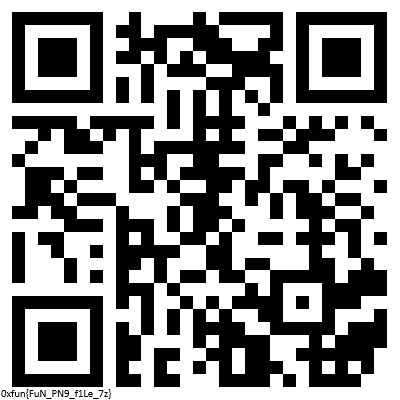
This image contains the final flag:
0xfun{FuN_PN9_f1Le_7z}Do not scan the QR code though, you will definitely regret it!
That's it for now. This is an experimental writeup I wrote. Any constructive criticism is welcome. Have a great day!